Madison Resort: Where Vintage Charm Meets Modern Luxury in Wildwood Crest, New Jersey, NJ

After two years of meticulous restoration and renovation, Madison Resorts proudly unveils its crown jewel: Madison Resort a vibrant oasis where vintage charm meets modern luxury in the heart of Wildwood Crest, New Jersey. With a nod to the iconic Doo-Wop era, reminiscent of Miami’s golden age, Madison Resort offers guests an immersive experience that transports them to a bygone era of retro glamour and timeless elegance.

Led by visionary Dan Alicea and his dedicated team, Madison Resort emerges as a testament to perseverance and passion, overcoming obstacles and challenges to breathe new life into the once-dilapidated Oceanview Motel. What began as a simple renovation project quickly evolved into a comprehensive restoration effort, as layers of history were uncovered, revealing the property’s rich heritage and architectural significance.

Vintage charm meets modern luxury in wildwood crest

Led by visionary Dan Alicea and his dedicated team, Madison Resort emerges as a testament to perseverance and passion, overcoming obstacles and challenges to breathe new life into the once-dilapidated Oceanview Motel. What began as a simple renovation project quickly evolved into a comprehensive restoration effort, as layers of history were uncovered, revealing the property’s rich heritage and architectural significance.

In December 2023, Madison Resorts expanded its footprint with the acquisition of The Royal Hawaiian, a neighboring property steeped in nostalgia and charm. Renamed “The Royal Tower,” this second jewel in Madison’s crown underwent its own transformation, seamlessly blending vintage aesthetics with contemporary design elements to create a harmonious retreat for discerning travelers.

Today, Madison Resort stands as a beacon of hospitality along Ocean Avenue, captivating visitors with its distinctive towers and vibrant facades. The Royal Tower, adorned with the Madison logo and splashes of sky blue, exudes a sense of modern sophistication, while The Madison Tower (formerly The Oceanview Resort) enchants guests with its lovingly restored lobby, complete with retro accents and vintage furnishings.

At the heart of Madison Resort’s allure lies its timeless design, inspired by the iconic Doo-Wop stylings of Miami’s heyday. Drawing from the vibrant colors and playful motifs of this bygone era, DAS architects have crafted a sanctuary that pays homage to the spirit of yesteryear, infusing every corner with a sense of nostalgia and whimsy.

madison resort is more than just a feast for the eyes

But Madison Resort is more than just a feast for the eyes; it’s a playground for the senses, offering an array of amenities and experiences to delight guests of all ages. From poolside cabanas to beachfront weddings, the resort promises unforgettable moments at every turn. With over 200 guest rooms, multiple dining options, and state-of-the-art facilities, Madison Resort sets the stage for a truly immersive escape.

As the sun sets on the shores of Wildwood Crest, Madison Resort comes alive with the sounds of live music and laughter, beckoning guests to indulge in the magic of the moment. From lively festivals to intimate soirées, the resort’s events calendar is brimming with excitement, promising endless opportunities for adventure and relaxation.

So whether you’re seeking a romantic getaway or a family retreat, Madison Resort invites you to experience the charm of the Doo-Wop era in Wildwood Crest. Book your stay today and make memories that will last a lifetime. Welcome to Madison Resort, where vintage allure meets modern sophistication, and every moment is infused with the spirit of Miami’s golden age.

30 Great Examples of Content Marketing

Content Originally posted by Heike Young for the SalesForce Blog
In keeping with our trend of highlighting 30 brilliant social media campaigns, we now turn our lens to content marketing. The Content Marketing Institute defines content marketing as “a marketing technique of creating and distributing valuable, relevant and consistent content to attract and acquire a clearly defined audience – with the objective of driving profitable customer action.”
The brands and efforts highlighted in this post definitely meet those qualifications when it comes to Digital Marketing. They’ve created something that’s valuable, relevant, and consistently useful to their audience (and a clearly defined audience, at that). Ultimately, I don’t know what actions were driven by these campaigns because I can’t peer into each brand’s analytics and conversion rates and it is sometimes hard to understand how does ringless voicemail work in regards to getting more customers. But I can attest that these campaigns caught my eye, and serve as shining examples of content marketing genius.
I’ve organized these into content-style categories to showcase the trends shaping today’s best content marketing. Trends include:

  • How-To Content
  • Shareable Visuals
  • Clever Curation and Crowd-Sourcing
  • what is self service
  • Behind-the-Scenes Brilliance
  • A+ Brand-Building

Get inspiration from the 30 most genius content marketing examples of 2014.
How-To Content
1. Anthropologie’s DIY drink recipes
Anthropologie frequently features DIY cocktail recipes on their blog, like this one for acoconut cooler. The drink recipes work for two main reasons: they’re seasonal and timely (for example, summer refreshers or winter warmers) and they feature unique ingredients and flavors, mimicking the original style of Anthropologie’s fashions. Like many examples of the best content marketing, these posts aren’t an obvious play for sales; Anthropologie doesn’t sell homemade bitters or simple syrup. Instead, the posts position Anthropologie as a trendy, knowledgeable friend who knows a thing or two about drinks-as well as clothes.

2. Intelligentsia Coffee’s Brew Guides
Brew Guides from Intelligentsia are the coffee industry’s answer to B2B whitepapers. Lovely photography precedes step-by-step instructions for a variety of coffee-making tools. Learn how to brew the perfect cup of coffee in a French press, Chemex, V60, and beyond. It’s free information that reminds you why Intelligentsia is such a lauded coffee master (we marketers might even say a coffee “thought leader”)… and the content makes you want a cup of their coffee ASAP.

3. Wistia’s Learning Center Videos
It’s a simple concept, but Wistia executes to perfection: short, educational videos that teach viewers how to be better video marketers. Many businesses might want to utilize an animation explainer video in order to showcase products and services they offer to customers. Each short lesson is a microcosm of some concept within video marketing, including bulleted lists for easier retention of the subject matter. I can think of very few brands that couldn’t create a video series like this for their products or services, with minimal resources invested. Check out this example video on concepting fundamentals. Most businesses aim to create a website that offers self-service toeir customers as this is the best way to sell products and increase customer satisfaction.If you are looking for more information about what is self service there are many websites that explain it in more detait.

4. American Express Gives Business Owners an OPEN Forum
Businesses of any size can learn something from the OPEN Forum posts by American Express. Posts center around leadership, customer service, marketing, and technology, and they position American Express as a true partner to business owners. Take a look at these examples of currently trending posts on the website, and get a glimpse of the free, valuable ideas being shared by the credit card company.

5. Birchbox’s Beauty Advice
Birchbox is a popular purveyor of monthly beauty boxes. The brand also runs an excellent content marketing program, with how-to videos of useful beauty tricks (for example, gettingbeach waves for short hair and how to look great post-flying). They’re essentially running a full-scale beauty magazine without the mess of paper and addresses.
6. Gov.UK Simplifies Civil Tasks
In the words of the site itself, gov.uk presents “simpler, clearer, faster” ways to accomplish government tasks. Most people dread filling out benefits forms or looking up info about birth certificates or marriage licenses, and this site is the answer to those qualms. The how-to articles guide UK citizens through a plethora of government tasks, for example, how to look after children after a divorce. The site content creators did an expert job of writing easy-to-read, jargon-free content and including bulleted lists with links for more information.
Shareable Visuals
7. Lana del Rey’s Tumblr
In 2014, the singer and songwriter Lana del Rey launched a new Tumblr. The first post on April 14 was a series of GIFs promoting her new album’s first single. The GIFs didn’t take any extra effort from her production team other than casting a few captures from her “West Coast” music video, but the GIF post has garnered more than 20,000 Tumblr notes. Not every brand has the video collateral of Lana del Rey, but every brand can take a step out of her Tumblr playbook in two ways. First, recycle content in short, visual, shareable snippets. Then, go where your fans are. Lana’s fans love Tumblr, so she’s building a new fan community on the platform.


8. Deus Ex Machina’s Dreamy Video
Custom motorcycle and surfboard outlet Deus Ex Machina consistently creates content that goes beyond selling. It delivers a culture. In the brand’s own words, “Deus ex Machina is a step bigger than a brand: it’s a culture. Our openness and enthusiasm strike a chord with people, wherever they are… Deus (‘day-us’) didn’t set out only to sell custom parts and hand- built motorcycles, but to celebrate a culture of creativity.”
In the brand’s latest short film I Had Too Much to Dream Last Night, the film crew follows surfers catching waves and living the dream in a beautiful landscape. The chill, vibey video doesn’t try to sell you surfboards or even mention Deus’s product lines, but simply reinforces the lifestyle that Deus is all about. To watch the full film, viewers must enter an email address, which is a smart way to deliver high-quality content at a negligible cost to the viewer.

9. Callaway Golf’s YouTube Is a Hole in One
Callaway Golf scores on YouTube, with excellent content that isn’t overly salesy or promotional. Videos include how to hit a bump and run and vertical centers of gravity in golf drivers. You don’t have to be a Callaway customer to benefit from this content, and next time you’re purchasing a golf club, you might just consider Callaway for their know-how and generosity.

10. Beats by Dre Can’t Be Beat on Instagram
Beats by Dre shows that their innovation isn’t limited to headphones. Their Instagram uses great visuals to build the brand and give fans a behind-the-scenes view of the company. Their content strategy includes short videos, commentary on current events (like the World Cup), and plenty of celebrity photos, which definitely don’t hurt.

11. Lion Brand Yarns Spins Helpful Content
This example could either fall under the visual or how-to categories of content styles. Either way, Lion Brand Yarns has created some excellent knitting resources and shared them on their site under a special video page. This video on knitted cast ons has garnered more than 325,000 views! The brand clearly understands that, in order to use its product and purchase more products in the future, you have to enjoy knitting and know how to knit. And what better way to educate current and potential customers than through shareable videos? It’s a great example of why content doesn’t need to be high-budget to be highly successful.
12. Business Insider India’s Infographic Educates on Business Schools
Infographics don’t have to be illustrated with artsy bells and whistles to be functional. This infographic by Business Insider India shows the top 25 business schools in the world through one cohesive, concise image. It’s designed simply and cleanly, with reader understanding at the forefront of the design. You see the ranking, a bit more info about the survey, and a bit more info about the participants. The design proves that content should be more about the information than the container.

Clever Crowd-Sourcing and Curation
13. Arcade Fire’s Fan-Sourced Gallery
One genius way to create content without much in-house effort: crowd-sourcing. Arcade Fire asked fans to submit their own photos of the band’s Reflektor tour, and in return, the fans’ photos could wind up on Arcade Fire’s Facebook page and website. This was a win for both the band and fans, as the website benefited from new photography, and fans could earn a spotlight on their favorite band’s online properties.

14. Random House’s Literary Inspiration
I appreciate the way Random House takes readers into the digital era with their Pinterest account and corresponding content. Books have been around forever, but publishing companies are just getting started when it comes to e-books and online engagement. Take a look at a few of Random House’s Pinterest board titles:

  • The Literary Imbiber
  • What Would Jane Austen Do?
  • Bookish Nooks
  • Literary Tattoos
  • Literary Wedding
  • Best Book Covers

Random House doesn’t write all the articles or create all the images associated with these boards, but curating them for their fans in a one-stop book-lover’s shop is a surefire win. With such targeted and well-curated content, it’s no wonder they have nearly 1.5 million Pinterest followers.
15. Virgin Atlantic’s Curated Instagram Galleries
Virgin Atlantic’s blog is filled with great travel content, from must-see sights in various cities to visually interesting galleries like this example from Tokyo. They curated photos from Tokyo-based Instagrammers for a quick peek at culture from the locals. Virgin Atlantic did a similar post for Los Angeles, and they also craft content for busy business travelers like their “Between Meetings” blog series.

16. Intel Has Content Marketing IQ
A classic example of great B2B content marketing, Intel runs a blog called IQ that’s “a peek at the outer edge of design, technology, social and big data.” The blog is largely based on content curated by employees. IQ’s editor in chief, Bryan Rhoads, says: “We developed an algorithm to curate social content in a way that leverages our employees. We want to publish what they’re sharing and what’s grabbing their attention. It’s a combination of a social algorithm, plus an employee filter that crowdsources what they are saying and sharing, and uses that as a discovery tool.”
17. Curata’s Slideshare Advice
Quotes can come in handy for marketers looking for advice and inspiration. Curata collected 27 quotes about content marketing from various experts, packaging the lot into a single Slideshare. Each slide includes the quote itself, along with the Twitter handle of each quoted person. The exercise required no original writing; just some reformatting and thoughtful quote selection.

18. Panera Bread Cozies Up to Pinterest
Pinterest is a great to build curated content because there’s so much readily available to re-pin and package into albums and stories that fit with your brand. See what Panera Bread has done on Pinterest, curating both their own content (like this Break Bread album with several links to their blog) and content from outside sources (like this album with tips to take better care of yourself). It all fits in with Panera Bread’s cozy, familiar, healthy (but not at the expense of comfort) image.

Behind-the-Scenes Brilliance
19. Disney Shares Behind-the-Scenes Magic
The Disney Parks Blog features an entire category for behind the scenes posts. Disney fans love to see the making of the magic, so these blogs provide a welcomed glimpse into the beloved parks and cast members.
Check out these recent posts for a content creation lesson from one of the best-marketed brands in history:


20. CB2’s “How It’s Made” Blog Posts
CB2, the affordable and urban-centric offshoot of Crate&Barrel, has an excellent blog called “In the Loop.” Features include behind-the-scenes looks at designers, patterns, and products, including this recent feature on tablecloth-making.
21. J.Crew’s Backstage Photoshoot Passes
Famous for great style and fabulous photography, J.Crew lets viewers take a sneak peek into how their photoshoots are conducted with behind-the-scenes blog content. Check out this recent post incorporating an artist’s story of how her paintings were included in a J.Crew shoot.
22. The White House Offers Humor, Insights
This photo gallery from the White House gives viewers a behind-the-scenes look at what the President and First Lady have been up to in 2014. With more than 150 photos, it’s a fun glimpse into a side of the First Couple that you won’t see in any press conference.

23. Microsoft Shows How a Tech Commercial is Made
Microsoft created a two-minute behind-the-scenes video to answer the question, “Wondering how we got the Surface Pro 3 from the bedroom to the board room in a single shot, without edits?” This video, narrated by the ad’s director, is an entertaining look at how much hustle it took to produce Microsoft’s recent Surface Pro 3 commercial.

24. Google Takes Street View Behind the Scenes
Ever wondered how Street View captures those infinite images of every nook and cranny in our world? Google has put together a beautiful “About Street View” page explaining how the service is compiled and maintained. They’ve also created behind-the-scenes videos of “Street View Treks” to highlight particularly inspiring locations.

A+ Brand-Building
25. Equinox Flexes Marketing Muscle
Equinox is a fitness club brand with multiple locations across the US. Aside from their generally gorgeous website, Equinox also runs an excellent health and fitness blog, proving that the company’s coaching ability goes far beyond personal training-it translates to content marketing, too. Recent topics include post-workout recovery, heart-healthy foods, and warm-weather workout gear. And check out this animated GIF, showing readers a plank they “probably aren’t doing, but should.”

26. New Belgium Brews a Well-Balanced Blog
Based in Denver, New Belgium Brewing showcases the brand’s adventurous, fun-loving energy on its blog. A quick scroll through recent posts shows customer-centered events (like the Tour de Fat), food and beer pairing ideas, and fetching photography of beer fans and brewers alike. And you won’t see any long lulls of silence from New Belgium; they update their blog at least once a week, which gives readers a reason to come back and check often for updates. The approach is a crash course in how to make an audience feel connected to a brand, no matter where they are in the world.

27. Whole Foods Tells the Whole Story
Natural grocery store giant Whole Foods has an incredible brand, and their blog is no exception. When you walk into a Whole Foods, you know what to expect: organization, a focus on eco-friendliness, extremely helpful employees, and above all, healthy food. Their Whole Story blog takes the brick and mortar experience digital with clean design and helpful articles. Instead of going for the hard sell, their content is useful and relatable. Check out this recent post about how to save money on weekly grocery trips.
28. GE Reports on Inspiring Technology
GE offers a beautiful blog interface and fascinating stories about technology on its GE Reports site, which lives on a separate domain from GE’s homepage. The stories on GE Reports center on what’s new in tech, brilliant machines, and advanced manufacturing to educate readers on current tech innovations. The site incorporates edgy imagery and easy-to-use social share buttons to widen the site’s audience. This animated GIF is from the article “Underdog Scientist Cracks Code to Reduce Flight Delays.”

29. Uber Drives Content Innovation
App-based car service Uber has revolutionized the way we call cabs in the digital era, so it’s no surprise that the brand understands digital marketing. Of particular note is their blog, which features categories like Uber Data, city-specific blogs, and product updates. Uber epitomizes a jet-setting, smartphone-centric lifestyle, and the company blog follows suit, with posts instructing users on how to expense Uber rides in Concur and which country’s Uber users are the most well-traveled.
30. Stanford GSB Teaches Business on Tumblr
Stanford Graduate School of Business positions itself at the cutting edge of the business world with an expertly executed Tumblr. “Big ideas, candid insights, and practical takeaways” are at the heart of the site, and they offer young professionals ample advice from Stanford GSB students, alumni, faculty, and staff members. Only a few readers of the blog may ever enroll at GSB, and many may not even be prospective students, but the on-point content solidifies the school as a frontrunner in business, and makes sure everyone knows that Stanford GSB understands digital publishing and relevancy.

Have a brand or example you’d add to this list? Leave a comment or send me a tweet (@YoungHeike)!
Content Originally posted by Heike Young for the SalesForce Blog

Real-Time Advertising on Facebook & Google


Your definition of real-time marketing is about to change. While real-time marketing will still revolve around social, new elements are hitting the scene. While real-time marketing on social media is efficient, it may not reach the top retailers you need to properly expose your brand. RangeMe allows direct contact with top retailers, with the opportunity to promote to places such as Target for target partners online. Despite this, real-time marketing is still a vital part of an advertisement.
Both Google and Facebook recently announced new real-time marketing additions. Google, of course, has been the key platform for internet marketing for a while now, with all brands and businesses looking to perfect their SEO so that they can perform best on Google. This is often done by professional SEO teams such as bigfootdigital.co.uk that help their clients become higher ranked on search engines. However, it seems that both Google and Facebook are developing their presence in the online marketing world. Unsurprisingly, both arrived just in time for the historic Super Bowl 50 on Feb. 7. Now both platforms can roll out their new features to eagerly awaiting brands and fans by seizing the Super Bowl’s momentum.
The 2015 Super Bowl was the most tweeted ever with more than 28.4 million tweets. Facebook also saw record-high numbers with more than 265 million posts and conversations about the Super Bowl.
The significant bump in both traffic and engagement drastically affected the ads running on Facebook. Click-through rates for Facebook ads were up 9 percent, while conversion rates increased by 415 percent compared to the Sunday prior, according to Marin Software data.
Super Bowl organizers announced this year’s NFL title game will be the most technologically advanced game ever played. With this in mind, the opportunity to generate mobile ad revenue is undeniable. I’m guessing it will be the most social game ever too.
Here’s what you need to know about the new real-time marketing additions. Follow along with the features as you tune into Super Bowl 50.

Google introduces real-time advertising

  • What: Real-Time Ads let brands publish advertisements live.
  • Why: Google wants “to help brands be a part of live events conversations in a way that’s timely and relevant.” Ideally, your message should “tie directly to the big moment consumers just experienced.”
  • Where: Your brand can instantly run real-times ads on YouTube as well as the apps and 2 million sites in Google’s Display Network.
  • When: Right now, this new addition is still in beta. Its first major test will be during Super Bowl 50. Later in 2016, the feature will roll out more broadly.
  • How: If you’re thinking, “How could I create and publish a relevant ad during a live event?” Google wants you to know that while the ad will run it real-time, “right now, the content is typically preplanned.” Phew! However, for some businesses, Google ads are not used because of rule changes, bail bond ads are one of these chosen. You can see why Google banned bail ads and what to do if you need to advertise in alternative ways. by looking at sites such as bailwebmasters.com.
  • Advantage for your brand: Real-Time Ads allow you to connect and talk with consumers when you have their full attention. So, make use of it. Oreo’s 2013 viral tweet about the Super Bowl power outage is a perfect example. Your brand can quickly chime in on real-time happenings. Or, you can amplify the same message that’s already running on other platforms.
Facebook’s new Sports Stadium can show live updates of the game as well as comments from friends. (Image: Facebook)

All about Facebook’s new real-time additions

  • What: Facebook Sports Stadium displays all content related to the game in one place. Specifically, you’ll see friends’ comments, experts’ commentary, live scores and game info. The game unfolds with a live play-by-play, even allowing you to comment on and share individuals plays.
  • Why: Facebook declares itself “the world’s largest stadium” with over 650 million sports fans. Now, they want Facebook to be your go-to place to watch and talk about the game.
  • Where: Search for the game in your search bar on iPhones. Facebook Sports Stadium will roll out on other platforms in the next few weeks.
  • When: It’s live! Right now, Facebook Sports Stadium is broadcasting American football games.
  • Advantage for your brand: There aren’t too many ways for your brand to participate in Facebook Sports Stadium – yet. For now, your best bet is to run Facebook ads during big football games to get your message out to a captive audience. Maximize your momentum by creating football-centric content.

Article originally posted by on Emma Fitzpatrick on Exclusive.Mulitbriefs.com

The Complete List of Bar & Restaurant Social Media Tips

Every business could use a boost in marketing, whether it’s selling a product or a service. In the case of restaurants, it happens to be both food and service. Running a restaurant can be immensely challenging. Using the best Restaurant Equipment would help make everything run smoother. Being able to show people that your restaurant is the place they want to eat (with Instagram pictures of fantastic food and shiny Nella Cutlery), is the root of your marketing, and social media should be your main conduit. So if you wish to make your restaurant look the best it can be and bring in new customers via Social Media, then check out 30 tips and recipes for sweet Social Media marketing success!

Social Media Branding

The most fundamental part of your Social Media marketing is having the audience recognize your brand. By having a carefully designed brand to carry the good name of your restaurant in Social Media, you showcase an image of class and professionalism, which is very important.
Know Your Target Audience
Be aware of what kind of establishment you run and aim for the people who are most likely to visit your restaurant. Whether you are a diner or a fancy high-class establishment, you should always be building an audience-focused Social Media marketing strategy.
Scope Out Your Competition’s Social Media
It’s important to be aware of what your competition may be doing with their social media, what new ideas they’re incorporating, and whatever they’re doing better than you. Have someone do a Social Content Audit for your site and Social Profile Audit for your pages.
Maintain Visual Consistency
This goes with your brand as it helps customers quickly identify with your posts. The colors, fonts, image quality, and overall visual theme should go well with your brand and be consistent across all social media platforms you are in. If you don’t have time to create social media images, you can always hire good designers to do it for you.
Spruce Up Your Pages
Going with the previous tip, you should put up cover images and other stuff on your Facebook and Twitter pages, as well as fill in all the details to help your audience know what you’re all about, where you are, and so on.
Do Facebook Sponsored Posts
Sponsored posts are basically ads on Facebook that show up like any other post, but can be visible to a target audience as a suggestion for them to like and follow. Go to Facebook insights and pick the best stories among your posts. It could be a video showcasing your customers and members, news on your latest’s offers, or even a contest you want your audience to participate in.
Target Your Ads at Your Local Area
For restaurants, any Social Media platform’s geotargeting option may be the most valuable ad you could run. Market to places near where your restaurant is to get a higher conversion off your marketing. Consider moms, millenials and mobile diners to be your most valuable targets.
Bar Restaurant Social Media Tips Philadelphia Digital Marketing Agency
Pick Your Main Platform(s)
While the previous tip helps you become more visible online, you may want to focus your social media efforts in one or two of them for best effect. Facebook and Instagram seem to be restaurant favorites these days, with Snapchat jumping up in popularity as well.
Put Your Brand on Every Image and Video
Post It does not have to be a gigantic logo displayed everywhere. Just have it in a corner of an image, visible but discreet. As for videos, just have an intro that is a few seconds long.
Make Use of Different Social Media Platforms
Do whatever you can to reach as wide of an audience as you can. Facebook, Twitter, and Instagram are a given, but you can also get into Foursquare, Yelp, Groupon, Snapchat, and others to boost your chances too.
Some of the newest platforms, like TikTok, can help you to advertise your restaurant to younger audiences. You may even want to have a look at places similar to – https://bumped.in/buy-tiktok-followers/, to find out how you can find followers quickly, so you can create videos at your own pace.
Be Authentic
The one thing that will help your brand the most is authenticity. Being genuine with your intentions and your actions in the restaurant and in social media is a long-term strategy that pays great dividends in time.

Social Media Content

This forms the meat of your social media marketing as you provide value to the audience by consistently posting high-quality content. In order to get value from the people, you must first give value to them through rich and interesting content.
Post Menu Items
You can post images of your menu items on Facebook and/or Twitter and include a link to the whole menu for those who may be interested.
Social Media Tips Philadelphia Digital Marketing Agency
Showcase Your Food and Services on Instagram
Since diners post pictures of food on Instagram nowadays, you should do so as well to show off what your restaurant has to offer. Other Instagram users can then see your food and be encouraged to check your place out.
Use Trending and Niche Hashtags
Hashtags are great for both utility and visibility. Trending hashtags expose you to a huge audience, while niche hashtags help potential customers within your area to find you.
Post More Videos
People always appreciate good video content. You can do things like showing how your cooks prepare your food or how your waiters conduct their service.
Practice Employee Appreciation
Similar to the previous tip, you can post content featuring your staff doing what they do. This lets customers see how much you care not just about your customers, but also the people who work in your restaurant.
Lists, Lists, Lists
Another thing people like are list articles. You can post something like “Top 5 Foods for Mother’s Day” or something else that is timely, offering information to the audience while still advertising your restaurant.
Images with Quotes
These are also popular in social media. While a picture is worth a thousand words, a quote can actually enhance the impact of that image. As long as it fits the image and resonates with the audience, it should do well.
Promos and Updates
Patrons of your establishment would like to know if you have new stuff going on, so provide updates on your primary social media outlets to let them know if you have a great discount or days when the place will be closed and so on.
Keep It Fun and Friendly
There is no need to be serious with your posts; restaurants are places where people go to relax and enjoy good food, after all. Inject some lighthearted humor into your content; casual, but not tacky. You’ll be surprised how well people take to it.
Be Consistent
Have a schedule for posting on social media. You may be able to automate your system, but it won’t do well if you don’t have a steady stream of relevant content at reasonable intervals. If you ever need a Social Content calendar, let us know – we have the best content chefs in town!

Social Media Engagement

Content may get the people interested, but it’s engagement that will make them stay interested and come back for more. Communicating with customers and showing that you care about them is an act that pays for itself and it adds ‘value’ to your overall branding.
Have Someone Read Comments
It can be tough to stay engaged since the negative criticism may get to you. If this is a problem, yet social media marketing is still important, then assign a social media manager to do it for you.
Let Customers Know You’re on Social Media
You don’t have to shout it out loud, but you can have your Facebook page or Instagram profile on your menu or on signs to make them aware of your online presence.
Social Media Tips Philadelphia Digital Marketing Agency
Ask Questions to Customers
Whether through comments or asking them to post with a specific hashtags, ask them about your service, their favorite menu item, and so on. You can learn a lot about your customers’ tastes and preferences this way.
Conduct Photo Contests
Have customers post their best pictures of your food online with a specific hashtag. You can then reward the winners with a free meal, gift certificates, or so on.
Have Giveaways
It’s one of the oldest, simplest, and most effective ways to get an audience engaged. For a restaurant, a giveaway should be done in a way that can be done seamlessly within the establishment.
Reward Customers Who Check-in with Location-based Networks
Show gratitude for those who check in with networks like Foursquare by providing exclusive discounts and other perks. This can encourage others to check-in as well.
Encourage Reviews
Customers appreciate establishments that value their input, so have them review your restaurant through platforms like Yelp in order to get feedback that can help improve your service.
Use Calls to Action
Humbly request your audience to follow, like, share, and comment whenever possible. Don’t be incessant about it; just drop it in whenever you have the chance and show them that you do care about your audience.
Keep Track of Your Followers
With the better analytics tools available in Facebook and other platforms these days, it’s much easier to track what they like and don’t like. It’s also a part of feedback in a way, so pay attention to that data.
Make Customers Feel at Home
What holds true in the restaurant is the same in social media. Being in the hospitality industry means being cordial and welcoming to customers. Thank them for their patronage and they will keep coming back.
Pin it on Pinterest
Originally posted by Kristel Cuenta of Kairay Media

Personal Facebook Posts from a Page | How To

If you own a business and operate your Facebook business page I’m sure you’ve had trouble with this before. You click to share a post to your personal timeline from your business page but it keeps popping back up on your business page. Here’s a quick outline on how to switch back and forth between your personal Facebook profile and business page while on your business page.
Facebook Page Help

Facebook Page Help
 
Facebook Page HelpFacebook Page Help
 
Facebook Page Help


Facebook Terms Everyone Should Know

Whether you’re a novice or experienced Facebook marketer, it’s easy to get tripped up on terminology. The social network has an extensive vocabulary that you’ll probably never be quizzed on, but knowing the difference between terms such as “total reach” and “organic reach” will impact your Facebook strategy. The same rules apply to other social platforms too so be careful not to trip up on any. Instagram and Twitter are also very popular social platforms that you might be using. Some of these terms can be applied to these sites too, however, some of them will vary. For example, on Facebook, you’ll most likely be concerned with likes on a page, whereas on Instagram you would be concerned with the number of followers you’d have on a page but because this post is dedicated to Facebook terminology, you can learn more on Nitreo here, which will give you an insight into Instagram followers.
We’ve compiled some of the most commonly used Facebook terms that you’ll come across as a marketer. Our resource is broken up into sections for convenience: General, Pages, and Insights.

General Definitions

This section might be a bit of a refresher for most readers. But if you or your admins are new to Facebook, it’s good to get acquainted with these terms as soon as possible.
1. Account Settings: Your settings are used to manage basic account preferences. Here you can edit your name or email, change your notification preferences, turn on extra security features, and more.
2. App: Facebook Apps are created by third parties and add more features and functionality to your Facebook experience.
3. Badge: A Badge is a personalized box you create to share your Facebook profile, photos, or Page on other websites.
4. Chat: Chat is a feature that lets you send instant messages to your friends.
5. Event: Use the Event feature to organize events, gather RSVPs, respond to invites, and keep up with what your friends are doing.
6. Follow: Follow is a way to hear from people you’re interested in, even if you’re not friends. The Follow button is always a way to fine-tune your News Feed to get the types of updates you want to see.
7. Friend: Friends are people you connect and share with on Facebook. You can send as well as receive Friend requests from other Facebook members.
8. Groups: Facebook Groups make it easy to connect with specific sets of people, such as coworkers. They’re dedicated spaces where you can share updates, photos, and documents as well as message other Group members.
9. Like: Clicking Like is a way to give positive feedback and connect with things you care about. When you Like something, the action appears as an update on your Timeline. Liking a post means you were interested in what a friend was talking about (even if you didn’t leave a comment). Liking a Page means you’re connecting to that Page, so you’ll start to see its stories in your News Feed. The Page will also appear on your Profile, and you’ll appear on the Page as a person who Likes that Page.
10. Messages: Messages are similar to private email messages. They appear in your Facebook Inbox and can include text messages, chats, emails, and mobile messages from your Facebook Friends.
11. News Feed: Your News Feed is a constantly updating list of stories in the middle of your homepage. It includes status updates, photos, videos, links, App activities, and Likes from the people, Pages, and Groups you’re associated with.
12. Notes: The Notes feature lets you publish messages in rich-text format, giving you greater flexibility than simple updates allow. In addition to formatting your text, you can add photos and tag other people in your note.
13. Notifications: Notifications are updates about activity on Facebook. For example, you can be notified when an update is made to a Group you belong to or when someone accepts your Friend request. While you can’t turn off notifications entirely, you can adjust what you’re notified about and how.
14. Poke: People use the Poke feature when they want to get someone’s attention or say hello. When you Poke someone, they’ll receive a notification letting them know that they’ve been poked and by whom.
15. Profile: Your Profile is your collection of photos, stories, and experiences that tell your story. It includes your Timeline, profile picture, biography, and personal information. It can be public or private, but is only for non-commercial use.
16. Search: Search is a tool to find people, posts, photos, places, Pages, Groups, apps, and events on Facebook.
17. Social Plugins: Social Plugins are tools that other websites can use to provide people with personalized and social experiences. When you interact with social plugins, you share your experiences off Facebook with your friends on Facebook.
18. Tagging: A tag links a person, Page, or place to something you post, like a status update or photo. For example, you can tag a photo to say who’s in it or post a status update and say who you’re with or where you are.
19. Ticker: The Ticker is positioned on the right side of your homepage and is updated with your friends’ activities in real-time. You can use it to keep up with the latest news as it happens, listen to music with your friends, or hover over a story to join in the conversation.
20. Timeline: Your Timeline is where you can see your posts or posts you’ve been tagged in displayed by date. It’s also part of your Profile.
21. Timeline Review: This is a tool that lets you approve or reject posts that you’ve been tagged in before they go on your Timeline. When people you’re not friends with tag you in a post, they automatically go to Timeline review.
22. Top Story: Top Stories include the stories published since you last checked News Feed that Facebook’s algorithm thinks you’ll find interesting. These items might be different depending on how long it’s been since you last visited your News Feed.
23. Trending: Trending shows you a list of topics and hashtags that have recently spiked in popularity on Facebook. This is a personalized list based on your location, Pages you’ve liked, and what’s trending across Facebook.

Pages Definitions

Facebook Page terms
Although your Facebook Page is just one of many aspects of the social network, it has a lot of its own terminology and features. This section focuses on the most important terms that you and your team need to know.
24. About Section: This section contains basic information that’ll help visitors quickly learn about your Facebook Page. Different types of basic information will appear in your Page’s About section depending on your Page’s category.
25. Activity Log: The Activity Log helps you manage your Page’s Timeline. It shows you a complete list of posts and comments by your Page, including posts you’ve hidden. Only people who help manage your Page can see the Activity Log.
26. Boost Post: Boosted posts appear higher in News Feed so there’s a better chance that your audience will see them. You can boost any post you create on your Page, including status updates, photos, videos, and offers. The cost to boost a post depends on how many people you want to reach.
27. Check-ins: This action announces a person’s location to their Facebook friends. If your Page includes an address, it will appear in a list of possible locations to check into when people are nearby. Once someone has checked in, a story (definition below) will be created in their friends’ News Feeds.
28. Cover Photo: This is the large picture at the top of your Page. All cover photos are public, which means that anyone visiting your Page will be able to see it. Best practices include using a unique image that represents your brand.
29. Liked by Page: This section features all of the other Pages that you, as the Page, Like.
30. Milestone: Milestones are a special type of Page post that lets you highlight key moments on your Page’s Timeline. You can use milestones to share important events that tell the story of your Page is about.
31. Offer: Certain businesses, brands, and organizations can share discounts with their customers by posting an offer on their Facebook Page. When someone claims an offer, they’ll receive an email that they can show at the Page’s physical location to get the discount.
32. Page: Facebook Pages help businesses, organizations, and brands share their stories and connect with people. Like profiles, you can customize Pages by posting stories, hosting events, adding apps, and more. People who like your Page can get updates in their News Feeds.
33. Page Admin: When you create a Page, you automatically become the Page’s admin, which means only you can change how the Page looks and post as the Page. You can then assign roles to other people to help you manage your Page.
34. Page Roles: There are five different roles for people who help manage Facebook Pages. These roles include admin, editor, moderator, advertiser, and analyst. Any person assigned to these roles will log into their own personal accounts and work on the Page from there.
35. Pin to Top: Any post that you pin will move to the top of your Page’s Timeline and a “pinned” icon will appear in the top-right corner of the post. Your pinned post will stay at the top of your Page’s Timeline for seven days. After that, it’ll return to the date it was posted on your Page’s Timeline. Only posts created by your Page can be pinned; posts that other people add to your Page aren’t supported by the feature.
36. Post Attribution: Your posts, Likes, and comments on your Page’s timeline will be attributed to the Page itself – even if you’re logged into Facebook as yourself and not the Page. Whether you’re creating a post or scrolling through News Feed, you can choose to act as a Page or as yourself from a convenient drop-down box.
Under Page Settings > Post Attribution, you can change the default to post as the individual rather than the Page. With this enabled, when anyone who manages your Page creates a post or comments, it’ll be attributed to that individual rather than the Page.
37. Posts to Page: Posts to Page are any posts made to your Page by someone other than an admin. This way, your Timeline will showcase messages and content from your brand only. Any questions or feedback from customers will be found in the Posts to Page section on the left-hand side of your Page.
38. Suggested Edits: People viewing Pages with locations that they can check into may see the option to suggest edits. This lets people suggest information that might be missing, such as a category, phone number, or address. If multiple people make the same suggestion, this information can be added to your Page to help other people find it. Page admins can confirm or remove information that’s been suggested.
39. Tabs: These are sections that come with your Page when you create it. They keep your Page organized and help people see specific content types, like photos and events.
40. Verified Page: Some Pages and profiles are verified by Facebook to let people know that they’re authentic. These can include celebrities and public figures, global brands and businesses, and media. Once verified, you’ll see a blue badge next to your Page’s name.

Insights Definitions
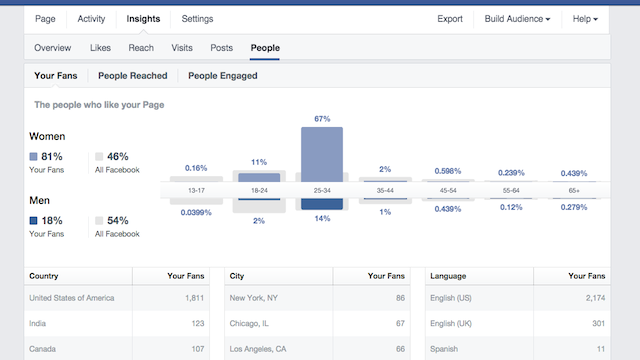
Facebook Insights Audience Terms
While Facebook Insights is similar to traditional web analytics data offerings, some of the terminology is unique to the platform. To make sure you’re not confused by any of the information you find in your Insights data, the following definitions should help make things more clear.

Analyzing Your Audience

From demographic characteristics to where they were before they came to your Page, Facebook Insights offers you a wide variety of metrics to help you analyze your Page’s audience. The following terms will help you understand what the data provided through Insights means so you can use it more effectively.
41. Cities/Countries: This is the number of people who saw any content about your Page grouped by country or city, based on IP address.
42. Daily Active Users: This metric is the number of people who have viewed or interacted with your Facebook Page on a specific day. It’s categorized by the type of action they perform.
43. Engaged Users: This is the number of engaged individuals who have clicked anywhere on one of your Facebook Page posts. For example, someone could have Liked one of your posts, commented on it, or shared it.
44. External Referrers: External referrers are the number of views your Facebook Page received from website URLs that aren’t part of Facebook.com.
45. Fans: In Page Insights, and other places on Facebook, “fans” is another way to refer to the people who Like your Page.
46. Friends of Fans: This shares the number of unique individuals who are friends with people who Like your Facebook Page. These people represent the total potential reach of content you publish to your Page.
47. Gender and Age: These demographic metrics detail the percentage of people who saw any content about your Page for each age and gender bracket, based on the information people enter in their personal profiles.
48. Language: This is the number of people who saw any content about your Page grouped by language, based on default language settings.
49. Like Sources: This is the number of times your Facebook Page was Liked, categorized by where the Like occurred during a specific date range. This lets you see whether the Likes come from your Page itself, from your website, or from other sources.
50. Monthly Active Users: This is the number of people who have viewed your Facebook Page or interacted with it during the previous 30 days. By tracking this metric, you can determine the degree to which your Facebook influence fluctuates monthly or seasonally.
51. Net Likes: This is the difference between the number of people who have Liked your Page and the number who unliked it over a specific period.
52. New Likes: This total is the number of unique individuals who Liked your Facebook Page during a specific date range that you set yourself.
53. Organic Reach: Organic reach is the number of unique individuals who saw a specific post from your Page on their News Feeds, tickers, or directly on their Pages.
54. Other Clicks: This is a measurement of clicks not on the content of your Facebook Page post, but rather of clicks on the Page title or to “see more.”
55. Paid Reach: This is the number of unique individuals who saw a specific post from your Page through a paid source like a Facebook Ad or Promoted Post.
56. Post Reach: This is the number of people who have seen your post. You post counts as reaching someone when it’s shown in their News Feed. Figures displayed in Insights are for the first 28 days after a post was created and include people viewing your post on desktop and mobile.
57. Reach: Reach is the number of people who received impressions (definition below) of a Page post. Reach might be less than impressions since one person can make multiple impressions.
58. Story: This term is used to reference the ways people can interact with your Page, including:

  • Liking your Facebook Page
  • Liking, commenting on, or sharing a post from your Page
  • Answering a question you asked on your Page
  • Responding to an event you posted on your Page
  • Mentioning your Page within their own posts
  • Tagging your Page in an uploaded picture
  • Checking in to or recommending your Page

59. Total Likes: This is the number of unique individuals who have clicked the button to Like your Facebook Page.
60. Total Reach: Total reach is the number of unique individuals who have actually seen any content related to your Facebook Page. This includes content published on your Page as well as Facebook Ads and Promoted Posts that lead people to your Page. If you’re looking to run ads for your business’s Facebook page then you could look at this example of Facebook ads for pest control to see in which ways they have managed to leverage advertising on that platform to boost their own reach online.
The sum of Post Reach won’t equal Total Reach because Pages can reach people through content other than posts. For instance, if someone visits a Page after searching for it, they’ll be counted in Total Reach but not Post Reach. Also, if someone sees more than one Page post, they’ll be counted in Post Reach for each post they see, but they’ll only be counted once in Total Reach.
61. Unlikes: This is the number of unique individuals who have unliked your Facebook Page during a specific date range.
62. When Your Fans Are Online: This shows you when the people who Like your Page are on Facebook content.
63. Where Your Page Likes Happened: This is the number of times your Facebook Page was Liked, broken down by where it happened. People can Like your Page using the Like button on your Page or from Page suggestions, ads, and stories about others who have Liked your Page.
64. Viral Reach: Viral reach is the number of unique individuals who saw a specific post from your Page through a story published by one of their Facebook friends.

Measuring Content and Engagement

It’s also helpful to learn which content you publish on your Page is most popular and creates the most engagement from your audience. The following Facebook terms explain some of the most popular Insights metrics that you can use to measure content performance and engagement levels.

65. Audience Retention: This metric details views of your video at each moment as a percentage of all views, including videos shorter than three seconds.

66. Daily Page Activity: This breaks down the different ways people engaged with your Facebook Page on a specific day other than by commenting on or Liking your posts. You’ll be able to see when fans post to your Page, upload photos or videos to your Page (if enabled), write reviews, or mention your Page in updates of their own or to friends.
67. Daily Story Feedback: This breaks down how people responded to your stories by engaging with them (through Likes or comments) or unsubscribing from them (which means your Page stories won’t appear in their News Feeds in the future), on a specific day.
68. Impressions: Impressions are the number of times a post from your Page is displayed, whether the post is clicked or not. People may see multiple impressions of the same post. For example, someone might see a Page update in News Feed once, and then a second time if their friend shares it.
69. Media Consumption: This is the number of times a piece of media content that you published on your Page – including a video, photo, or audio clip – is clicked and viewed on a specific day.
70. Page Content or Post Feedback: This is the number of Likes and comments on stories published in your Page’s News Feed during the time period you select.
71. Page Views: Page views are the total number of times your Facebook Page was viewed during the time period you select.
72. Pages to Watch: This helps you compare the performance of your Page and posts with similar Pages on Facebook.
73. Post Views: Post views are the number of times a story published on your Facebook Page News Feed was viewed during the time period you select.
74. Tab Views: This is the total number of times each tab in your Facebook Page was viewed when people were logged in to Facebook during the time period you select.

75. Video Views: This is the total number of times a video posted by your Page was viewed for three seconds or more.

Originally posted by Sprout Social